Project = window
Close the window and Slate saves the tab set. Reopen the project and everything comes back - same tabs, same order, same active tab.
Stop drowning 50 tabs from 5 projects in one window. Slate gives each project its own window - and saves the tabs, groups and pinned state exactly, so you switch context without ever losing your place.
Close the window and Slate saves the tab set. Reopen the project and everything comes back - same tabs, same order, same active tab.
Group titles, colors and collapsed state survive the full round trip. Your structure is never flattened into a bookmark dump.
Pinned state is restored on reopen, so your always-on tabs stay exactly where they belong in every project window.
The toolbar shows the current project's initials in its own color - you always know which project window you're working in.
Rename, reorder by drag & drop, recolor and delete projects from Chrome's built-in side panel. 335 curated Lucide icons or upload your own.
Move projects between machines as JSON, and drive Slate from your terminal with the optional bash CLI.
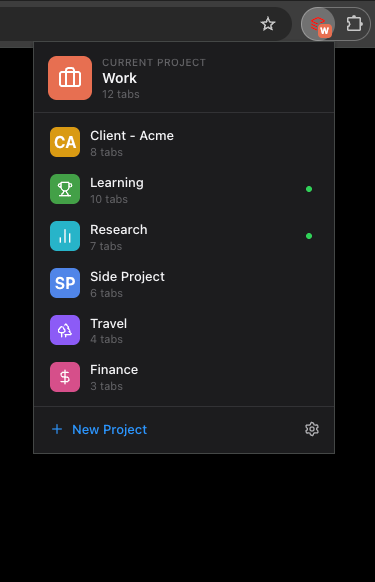
Pick a project from the toolbar - its window opens or focuses instantly.
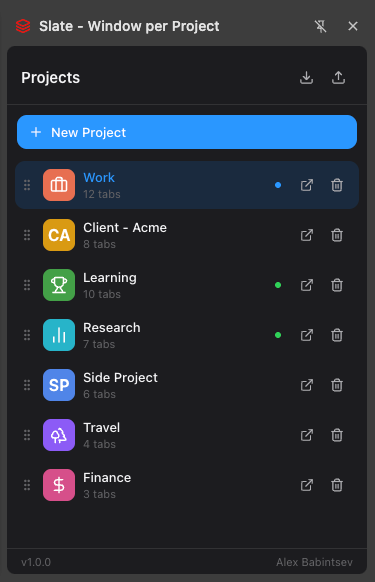
Drag to reorder, recolor, rename and delete - all in the side panel.
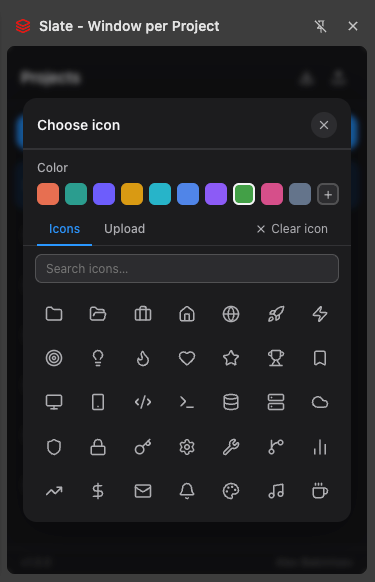
335 curated icons, any color, or upload your own image.
Most tab managers store sessions you restore by hand. Slate ties projects to real Chrome windows and auto-saves on every change - your work becomes named workspaces, the way Chrome was meant to be used.
One Tab, Session Buddy - just a flat list of saved sessions you reopen manually.
Workona and friends - a whole separate UI layered on top of your browser.
Each project lives in its own native Chrome window. Auto-saved. Zero new UI to learn.
An optional bash wrapper opens, closes and lists projects without leaving the keyboard - perfect for wiring into your existing dev scripts.
$ slate open "Work"
→ opening window · 12 tabs · 3 groups restored

$ slate list
  Work    12 tabs   ● open
  Study    9 tabs   ○ saved
  Side     6 tabs   ○ saved

$ slate close "Work"
→ tab set saved · window closed
Everything Slate does today, fully local and open source.
For people who live across machines and need their workspaces everywhere.
No spam. One email when Pro is ready.
Slate makes zero outbound network requests. Your projects, tabs and icons live in chrome.storage.local on your device - never uploaded, sold or shared.